The Activity Feed
View your Activity Feed.
Read the Activity Feeds announcement and learn more about creating a living OKR system.
What is the Activity Feed?
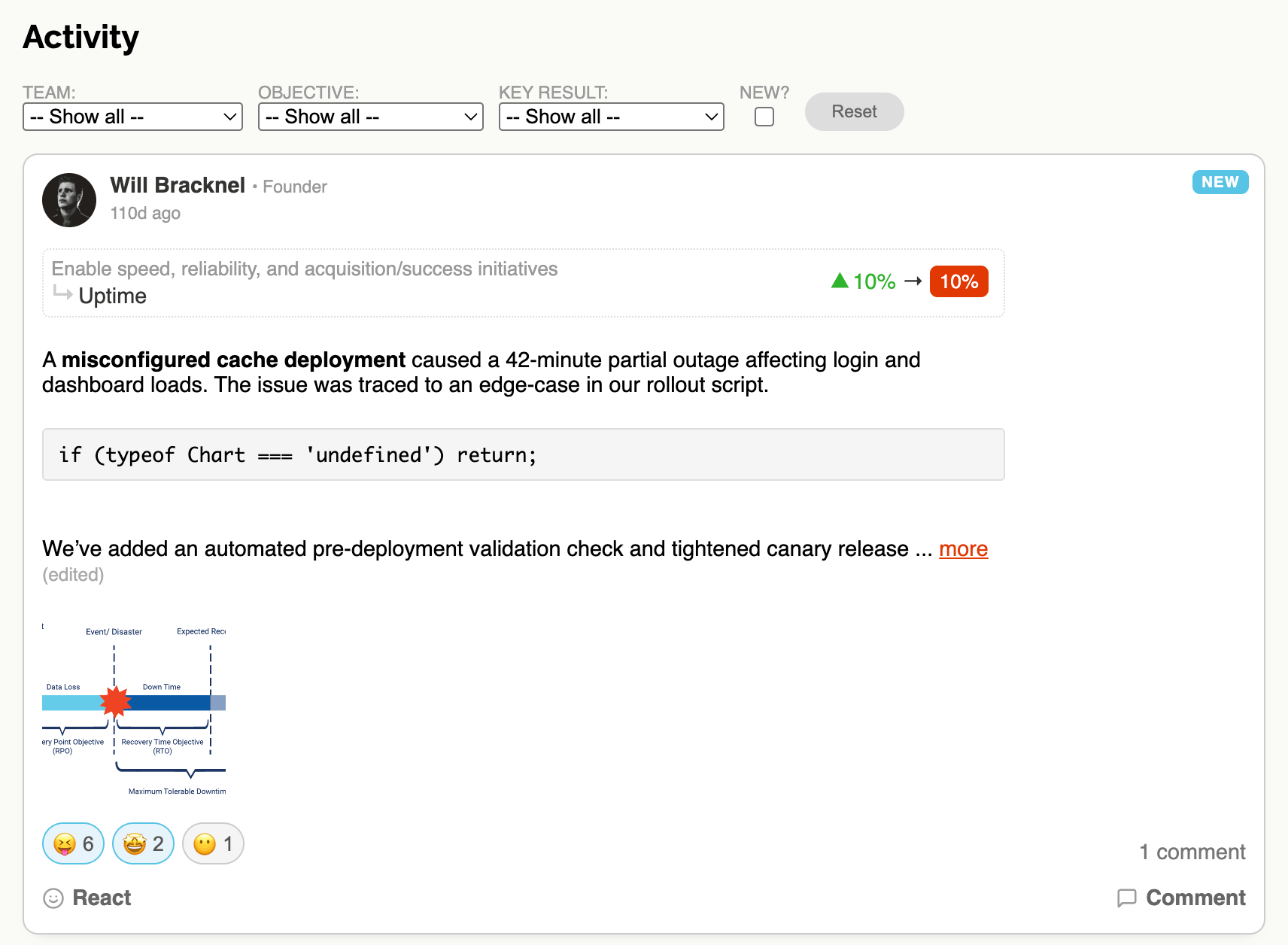
The Activity Feed is a real-time stream of all Check-In updates happening across your Workspace. Every time someone records progress on a Key Result, it appears in the feed for everyone to see.
It's designed for everyone in the Workspace - team members, managers, leadership and stakeholders alike. Whether you're tracking related work, monitoring outcomes, or just want to stay in the loop, the Activity Feed gives you a single place to see what's happening.
Why the Feed matters
Most OKR tools treat tracking as a static, admin-driven exercise: set your goals, update a spreadsheet, review once a quarter. The Activity Feed changes that by making progress visible and social.
When updates flow through a shared feed, several powerful things happen:
Visibility builds trust: people can see that work is happening across the organisation, not just in their own team. This makes alignment feel real rather than theoretical.
Engagement creates habit: seeing others post updates motivates people to post their own. Over time this builds a rhythm of regular updates that keeps OKRs alive throughout the quarter.
Celebration and support: emoji reactions and comments turn Check-Ins into two-way conversations. Great progress gets recognised, and struggles get surfaced early so the team can help.
Culture change: the feed moves OKRs from a planning exercise into a living system where progress is shared, discussed and acted on in real time.
For many users, the Activity Feed becomes the natural homepage - the first place they visit to understand the pulse of the company.
How it works
Each item in the feed is a Check-In on a Key Result. The feed shows:
Who made the update, and their role (KR owner, Objective owner or Team member).
The Key Result and parent Objective, linked to their detail pages.
The progress change, colour-coded: green for positive movement, red for negative, and grey for no change.
The Check-In comment, with full text formatting and any attached images.
Emoji reactions and comments from other team members.
The feed is scoped to the current Cycle and shows the most recent updates first, with a "Load more" button to keep scrolling back through history.
New Check-In highlighting
When Check-Ins have been posted since your last visit, they are highlighted with a NEW badge so you can easily see what's changed. A counter next to the Activity link in the navigation bar shows how many new updates are waiting for you.
Once you've seen a Check-In, it's automatically marked as viewed and the badge is removed. This makes it effortless to stay current without having to read through everything.
Filtering the feed
If your Workspace has a lot of activity, you can narrow down the feed using filters:
Team: show only updates from OKRs assigned to a particular Team.
Objective: show only updates on Key Results belonging to a specific Objective.
Key Result: show only updates for one particular Key Result.
New only: show only Check-Ins you haven't seen yet.
Filters can be combined. Use the reset button to clear all filters and return to the full feed.
Interacting with the feed
The feed isn't just for reading. You can react with emoji, leave comments, and read discussions - all without leaving the page.
For a more analytical view of the same data, see the Reporting view which aggregates Check-In activity into tables and charts across the whole Cycle.