How To Create a Living OKR System
Many companies adopt OKRs with good intentions. Leadership reads about how companies like Google use them, a quarterly planning session is scheduled, and teams spend several days writing thoughtful objectives and key results.
Then something predictable happens.
For the next few weeks, everyone is busy shipping work, handling customer issues, and responding to whatever feels urgent. The OKRs sit in a document somewhere. By the time the quarter review arrives, people are trying to reconstruct what happened.
This is the “set and forget” OKR problem.
It’s one of the main reasons OKRs fail. And interestingly, it doesn’t usually happen during planning. The real problem is what happens during the quarter.
Most organisations never build the operating rhythm required to keep OKRs alive. Start with high-quality OKRs—using well-crafted AI prompts can help before you even set up the execution system.
This article explains how to create a living OKR system that teams actually use every week. It covers practical best practices, the weekly cadence that makes OKRs work, and how modern OKR management software like OKR Dash can support that process.
If you get this right, OKRs stop being a quarterly document and start becoming a weekly execution system.
Why most OKRs die after planning
The planning phase of OKRs usually goes well.
Teams define objectives. Key results are debated and refined. Leadership signs off on priorities. Everything feels structured and intentional.
But planning only solves one problem: deciding what matters.
Execution is a completely different challenge.
During the quarter, three things typically happen.
First, OKRs have no operational home. They might live in slides, spreadsheets, different chat threads, emails or Notion pages. Those places are spread out, not always available to everyone, rarely part of day-to-day discussions about delivery and priority: so people don’t return to them.
Second, updates are performative instead of useful. Teams provide occasional status updates that say things like “on track” or “slightly delayed”. These updates often lack context and rarely help anyone make decisions.
Third, leaders lack real visibility. Information is fragmented across meetings and documents. Leadership ends up relying on summaries rather than real signals about progress.
When this happens, OKRs slowly fade from daily work.
Or maybe they get looked at every month, but the metrics sort of don't make sense anymore, and no progress has been made against half of them, so ... let's look again in another month.
The result is predictable. Teams focus on whatever feels urgent. At the end of the quarter, everyone tries to reconnect the work that happened with the goals that were originally written.
A functioning OKR system requires something different: a weekly operating rhythm.
The missing middle: the weekly operating rhythm
Most OKR guidance focuses on planning and quarterly reviews.
What’s missing is the middle of the quarter, where the real work happens.
For OKRs to be effective at driving action and priorities, teams need a simple cadence that keeps objectives visible and actively discussed. A weekly rhythm is usually enough.
That rhythm should make four things easy:
- Updating progress
- Adding context and learnings
- Seeing progress across teams
- Reviewing results together
When those behaviours become routine, OKRs remain present throughout the quarter.
This is where a well-designed OKR tracking software or OKR platform becomes helpful. The goal is not just storing goals. The system should support the behaviours that keep OKRs active.
Let’s look at four practical steps that help turn OKRs into a living system.
Step 1 — Give every OKR a home
One of the simplest but most powerful changes is giving each OKR a single place where everything about it lives.
In many organisations, information about an objective is scattered:
- OKR wording and ownership is recorded in docs
- Progress is tracked in a spreadsheet
- Updates happen in Slack or verbally in meetings
- Context lives in notes or project tools
When someone asks, “How is this objective actually going?”, the answer often requires chasing information across multiple sources.
A better approach is giving each OKR its own page.
This is the idea behind the OKR Profile Page in OKR Dash.
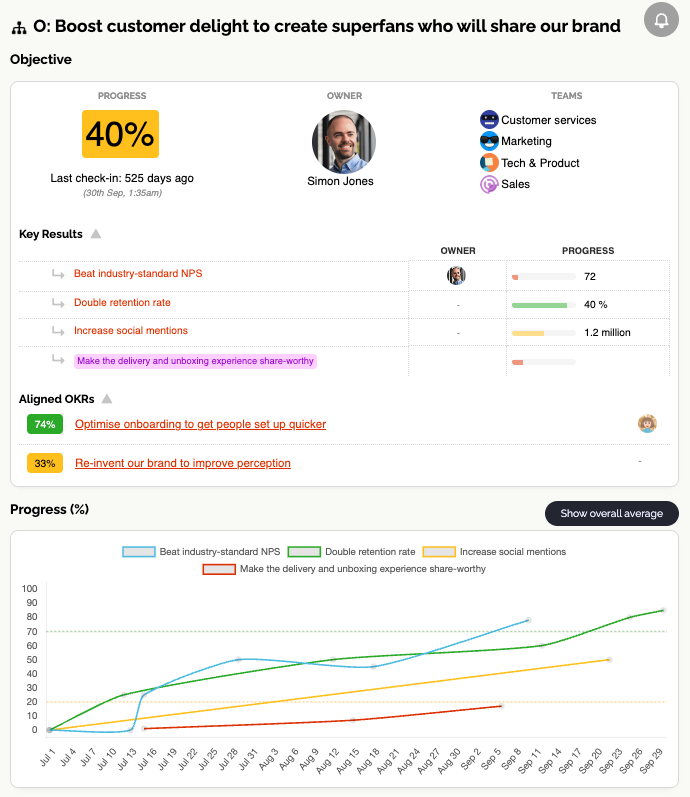
Each OKR becomes a living record that includes:
- Current rolled-up progress
- Individual key result progress
- A feed of updates and check-ins
- Links to aligned work or related OKRs
Instead of being a static goal written during planning, the objective becomes a working activity hub.
People can quickly see what has happened recently, what progress looks like, and how the work connects to other parts of the organisation.
This structure also helps with OKR progress tracking, because historical context is preserved. When teams review a quarter later, the entire story of that objective is visible.
Importantly, this reduces friction. When information has a clear home, people are much more likely to keep it updated.
Step 2 — Turn updates into a habit
Many companies attempt OKR updates but struggle to maintain them.
The problem usually isn’t intent. It’s habit formation.
Updates feel optional. They happen irregularly. Over time they fade away.
A better approach is to design a simple weekly check-in routine.
For example:
- Key results are updated once per week
- Teams add short notes explaining changes
- Progress trends become visible over time
The key idea is consistency rather than detail. Updates do not need to be long reports. Often a short update explaining what moved and why is enough. And if nothing moved, record what shipped, and why it's had no effect (yet).
This is where an activity feed becomes useful.
In OKR Dash, every update appears in a central feed showing what changed across the organisation. This creates a small but powerful feedback loop. We use smart reminders to gently and positively nudge people to leave updates.
People see progress happening.
They see other teams posting updates.
They see conversations forming around specific objectives.
The rebuilt Activity Feed makes this even easier with reactions, comments and rich formatting.
Over time this encourages participation. Updates stop feeling like administrative work and start becoming part of normal weekly communication.
This also solves another common issue: performative updates.
Instead of vague summaries prepared for meetings, updates are tied directly to key results and visible to everyone. The focus shifts toward real signals of progress. For practical tips on writing better updates, read how to write OKR updates people actually read.
Step 3 — Make progress visible to everyone
Even when teams update their OKRs, visibility can still be a problem.
Leadership often receives filtered information through slides or summaries. Teams rarely see what other teams are working on. Progress signals get lost.
Good OKR systems make progress visible and accessible.
This is where OKR dashboards become important.
Dashboards allow organisations to curate views of relevant OKRs. Instead of one giant list of goals, teams can create focused dashboards that show the work they care about.
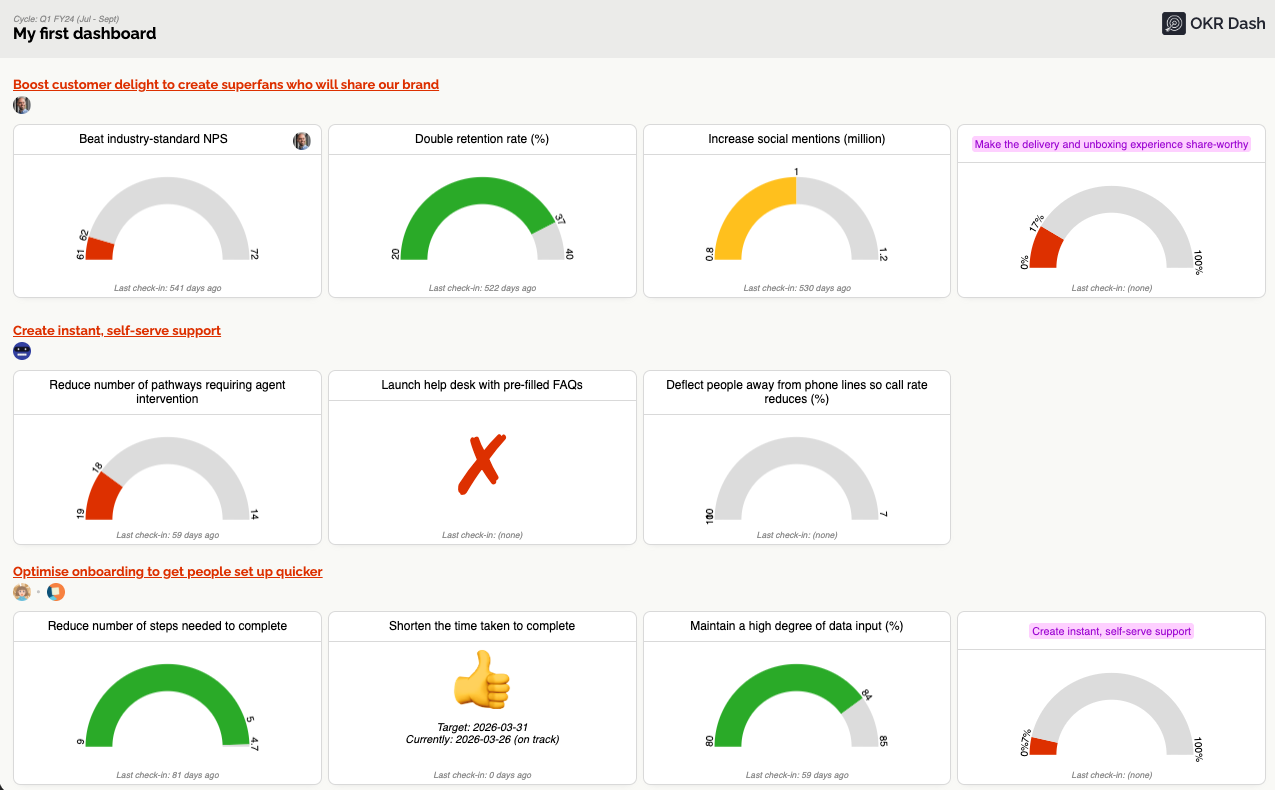
Examples include:
- A company leadership dashboard showing top-level OKRs
- A team dashboard showing everything a team owns
- A project dashboard showing a group of related objectives
- A personal dashboard showing goals owned by one individual
In OKR Dash, dashboards can be created and configured easily. Teams simply select the OKRs they want to display.
These dashboards can also be shared publicly within the organisation or displayed on large screens. This makes them useful as a central OKR tracking dashboard that keeps progress visible throughout the week.
Visibility changes behaviour. When progress is visible, teams naturally pay more attention to the work that matters.
Step 4 — Weekly review meetings
Many organisations still rely on manually created slides to discuss progress. Or they stare at complex spreadsheets with numbers everywhere and only half of them are up to date or useful. This creates extra work and often results in outdated information.
Instead, OKR review meetings should use a live view of OKR progress.
OKR Dash includes a Presentation View designed specifically for this purpose. Dashboards can be displayed in a clean, full-screen format suitable for team or leadership meetings. And it includes the latest Check-In update for each KR, and trend graphs of progress for each KR, so everything's right there - zero effort.
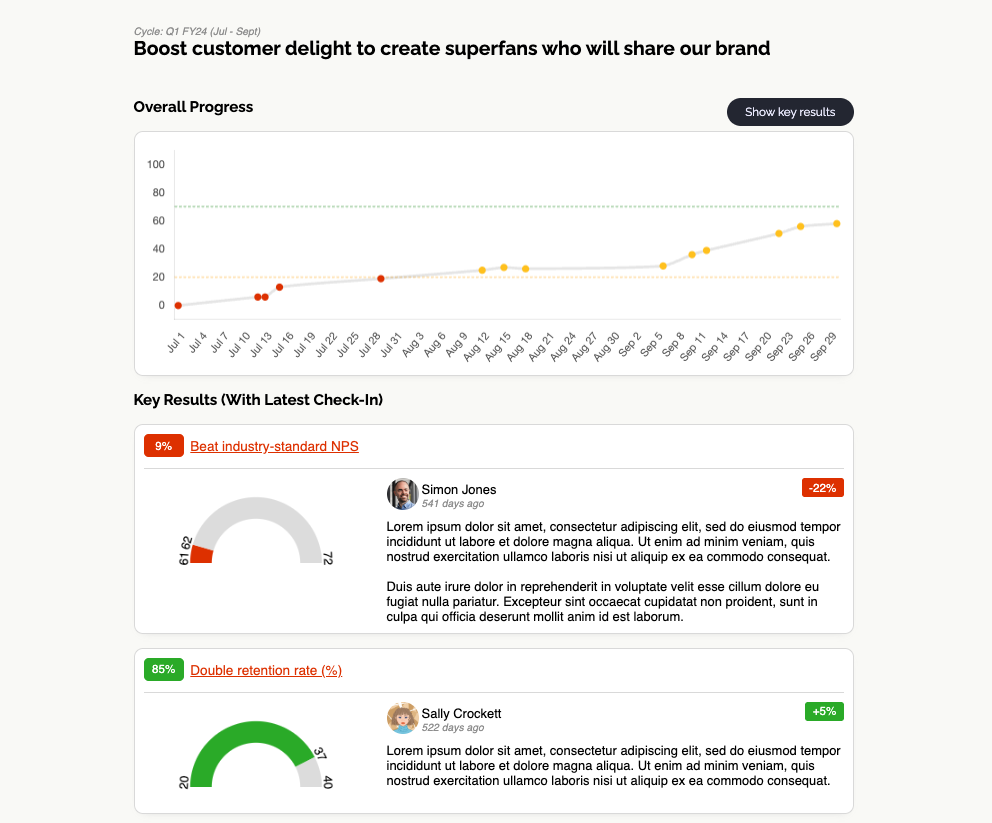
And because the view is connected directly to the OKR system, the information is always current.
This makes it easy to structure a simple weekly cadence.
Example OKR weekly cadence
Friday — Key result updates
Teams update their key results and add short context notes. These updates appear automatically in the activity feed.
Monday — Discussion and context
Teams discuss progress in the feed or during short check-ins. This might include explaining experiments, blockers, or unexpected results.
Tuesday — Dashboard review
Leadership or teams review progress using dashboards or presentation view. The goal is not reporting, but understanding trends and identifying decisions.
This rhythm keeps OKRs visible every week without adding heavy process.
It also helps answer three practical questions:
- Where are we trending?
- What changed this week?
- What decisions are needed?
For help catching stalled work early, see how to spot a stalled OKR in 7 days.
When those questions are easy to answer, OKRs start functioning as a real operating system.
Turning OKRs into a weekly execution system
The difference between successful and unsuccessful OKR programs is rarely the planning process.
The difference is what happens during the quarter.
Teams that succeed with OKRs create a simple weekly cadence supported by tools that make progress visible and easy to update.
In practice, that means:
- Every OKR has a clear home where progress and context live
- Updates happen weekly and appear in a shared activity feed
- Dashboards provide visibility across teams
- Meetings use live progress views instead of manual reporting
When those elements are in place OKRs remain active throughout the quarter:
Teams see progress evolving week by week. Leaders gain real visibility into execution. And discussions focus on decisions rather than status reporting.
If you’re looking for an OKR software that supports this kind of living system, OKR Dash was designed around exactly these principles.
With OKR Profile Pages, activity feeds, custom dashboards, and presentation view, OKR Dash helps teams keep OKRs active throughout the quarter instead of letting them fade after planning.
If you want to turn OKRs into a true weekly operating system for execution, it’s worth a shot: start building your own living OKR system today.
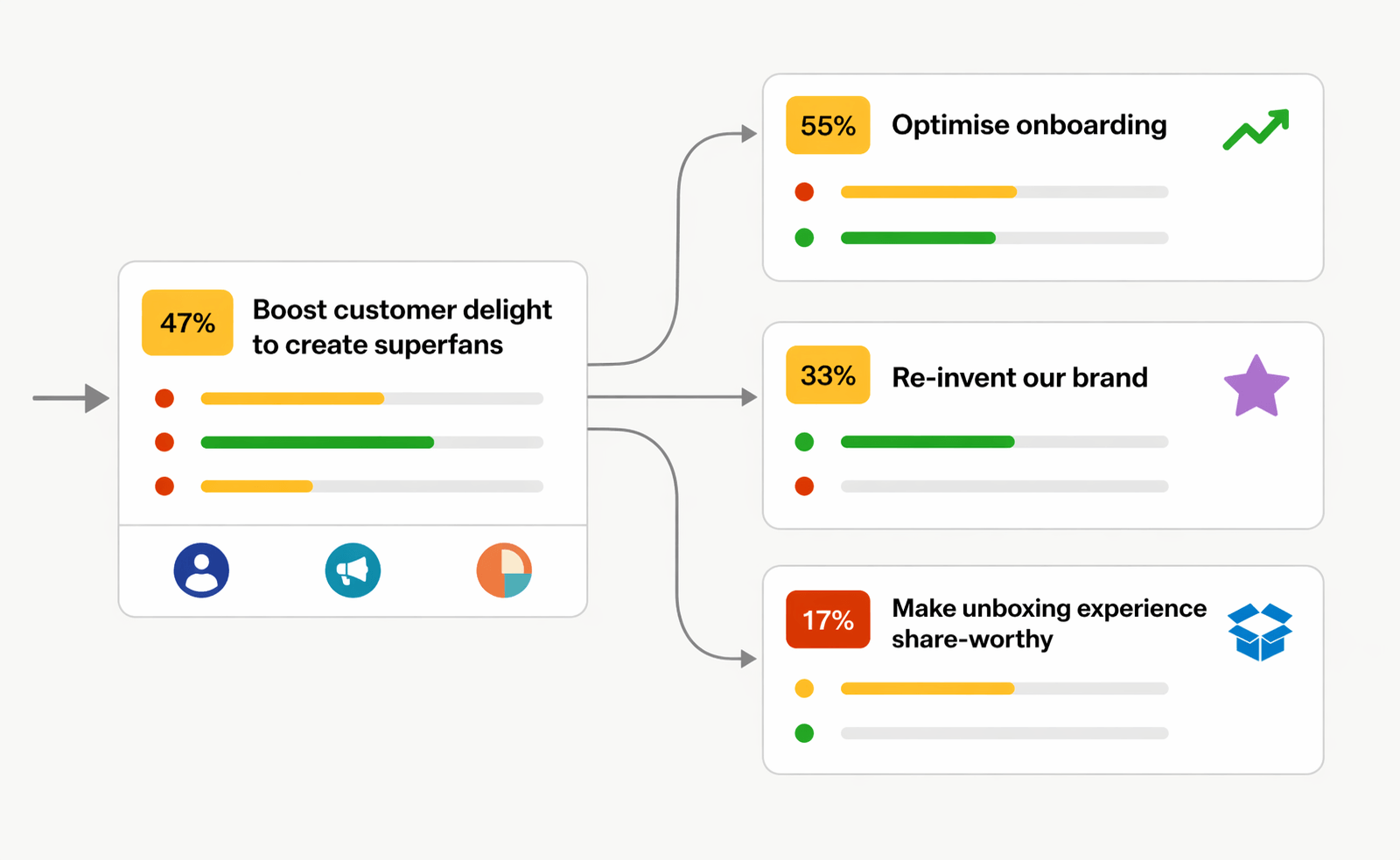
OKRs done right.
OKR Dash is a powerful tool for managing your OKRs.
No more siloed spreadsheets or manual tracking. One place to align teams and drive outcomes.