January '26

Check-Ins & Reminders That Build Habits (Not Resistance)
Check-ins are the heartbeat of OKRs. They’re how goals stay alive, relevant, and actionable week to week.
But they’re also easy to get wrong — especially when reminders start to feel like noise instead of support.
This release is all about making check-ins easier to do, and reminders harder to ignore for the right reasons.
A Quick Recap: What Check-Ins Do
Check-ins have always been a core part of OKR Dash. Users can update a Key Result’s current value and leave commentary on progress, blockers, or confidence.
What’s changed isn’t the idea of check-ins — it’s how we help teams stay consistent with them, without nagging.
The Reminder Problem
Reminders sound simple. In practice, they’re not.
Highly accountable people — the ones you most want using OKRs well — are often the quickest to tune out blunt reminders. Too many tools default to “send more pings”, which leads to avoidance instead of action.
We explored several models before landing on our approach:
A) Fixed reminders, no context
Send a reminder every two weeks, regardless of whether someone has already checked in.
- Pro: Easy to build
- Con: Quickly becomes spam
B) Fixed reminders, with a lookback window
Send a reminder every two weeks, but only if no update has been made in the last N days.
- Pro: Fewer unnecessary reminders
- Con: Still calendar-driven, not behaviour-driven
- Con: More configuration rarely equals better outcomes
C) Remind based on inactivity
Send a reminder only if it’s been two weeks since the last update.
- Pro: Tied to actual behaviour
- Pro: Feels fair and relevant
- Con: Requires better tracking logic
D) Weekly summary + in-app signals
A regular weekly email which gives a snapshot summary, paired with contextual in-app notifications that show what’s overdue.
- Pro: Encourages habits
- Pro: Consolidated, not interruptive
- Pro: Easy to scan and act on
We chose a D — reminders triggered by inactivity, delivered in a way that supports routines rather than breaks focus.
Feature 1: In-App Notifications for Overdue Check-Ins
When a check-in becomes overdue (with the threshold configurable by an Admin), the accountable user will see an onsite notification.
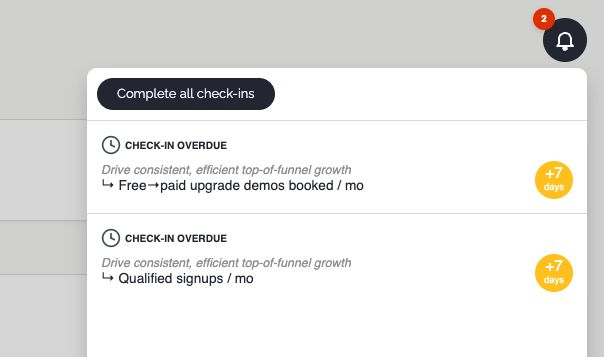
A few important details:
- Accountability follows the same hierarchy introduced previously
- Notifications refresh twice per day, so edits to OKRs, teams, or ownership are always reflected
- Notifications point to action, not just awareness
This keeps responsibility clear, without broadcasting noise to people who aren’t accountable.
Feature 2: Weekly Summary Email
Once per week, on a day chosen by your Admin, users receive a summary email of any outstanding check-ins.
This is deliberate:
- It’s predictable
- It’s consolidated
- It reinforces a rhythm
OKRs work best when they’re habitual. A weekly cadence creates a natural moment to pause, reflect, and update — without constant interruptions during the week.
Feature 3: A Much Smoother Check-In Experience
We’ve also made the act of checking in significantly easier.
You can now leave a check-in:
- From the Key Result detail page
- Directly from the notification centre
- Straight from the weekly summary email
And for those with multiple outstanding check-ins, there’s a new guided flow that walks you through them one by one. You can skip anything you’re not ready to update — no pressure, no blockers.
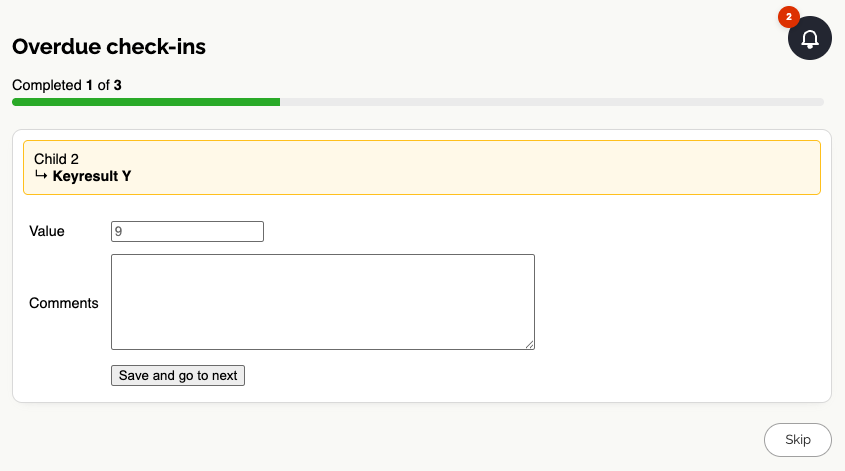
The goal is simple: make check-ins something you can knock over in a focused session, not a chore you keep postponing.
Small Friction, Big Consistency
None of these changes are flashy on their own. Together, they remove friction from one of the most important OKR behaviours: staying current.
Better reminders. Easier check-ins. Stronger habits. Consistent action drives results more than OKR scoring.
If you want OKRs that actually stay alive week to week, now’s a great time to get started.
👉 Register for OKR Dash