January '26
Ownership, Made Visible
One of the most common failure modes of OKRs is ambiguity.
Who owns this? Who’s accountable? Who’s meant to act when progress stalls?
This release is all about fixing that — by making ownership explicit, visible, and human.
We’re introducing uploadable avatars for Users and Teams, alongside single, clearly defined Owners for both Objectives and Key Results. On their own, these are simple features. Together, they reinforce one of the most important principles of effective OKRs: someone has to be on the hook.
Making Work Feel Human
OKR tools often drift toward the abstract: titles, percentages, charts. Useful, but impersonal.
Avatars bring a sense of identity back into the system.
You can now upload custom avatars for:
- Individual users
- Teams
This does a few things immediately. Names become more recognisable at a glance. Dashboards feel less sterile. Ownership feels attached to a real person or group, not just a row in a table.
It’s a small change, but it meaningfully shifts the tone of the product toward people owning outcomes, not systems tracking metrics.
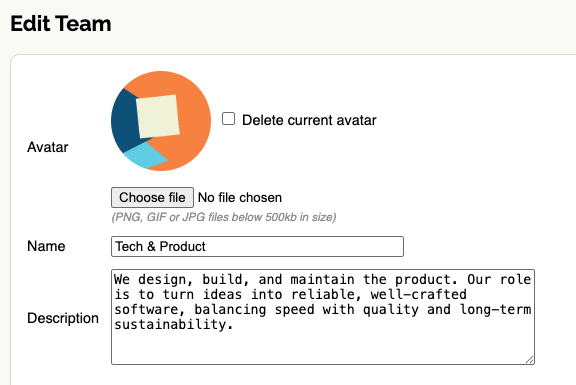
How to set an avatar
From a User or Team profile page, upload an image and save. Avatars will appear consistently across Objectives, Key Results, and dashboards wherever that person or team is referenced.
Clear Owners, Clear Accountability
The more significant change in this release is the introduction of single Owners for both Objectives and Key Results.
Previously, ownership was often implied through team assignment or visibility. Now it’s explicit.
Every Objective can have one Owner.
Every Key Result can have one Owner.
That clarity matters. Ownership is not about blame — it’s about responsibility, follow-through, and decision-making. When progress slows or a decision needs to be made, it should be obvious who is responsible for unblocking things or driving the next step.
A hierarchy of ownership
To support real-world complexity, we’ve implemented a simple hierarchy:
- Key Result Owner
- Objective Owner
- Team members assigned to the OKR
- Anyone in the company
In practice, this means:
- If a Key Result has an Owner, that person is accountable,
- If not, responsibility rolls up to the Objective Owner,
- If no Objective Owner is set, then the assigned Teams are accountable,
- And finally everyone in the wider company if there are no Teams (this shouldn't happen though!)
This mirrors how work actually happens, while still ensuring there’s always a clear first point of accountability.
Why This Matters for OKRs
Well-run OKRs depend on a healthy culture of accountability. Not performative accountability, and not micromanagement — but clear ownership paired with trust.
When ownership is visible:
- Conversations are easier and more direct
- Progress reviews are more productive
- Responsibility doesn’t get diffused across groups
Most importantly, it reinforces the idea that OKRs are owned, not merely tracked.
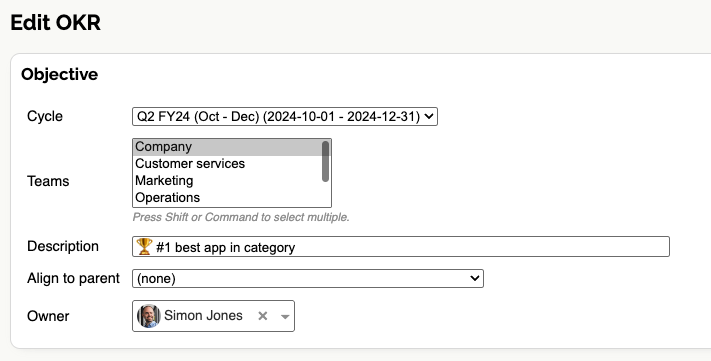
How to assign an Owner
When editing an Objective or Key Result, select an Owner from the new Owner field. The selected user’s avatar will be displayed wherever that item appears, making ownership immediately visible throughout the app.
A Foundation for What’s Next
These features are foundational. Avatars and explicit ownership unlock a lot of future possibilities around collaboration, notifications, and responsibility — but even on day one, they make OKRs clearer, more human, and more effective.
Ownership works best when it’s obvious. This release makes it hard to miss.
Ready to make ownership clear and accountability visible?
Move your OKRs to OKR Dash and see how explicit ownership changes the way teams execute. Strengthen accountability further with weekly snapshot reporting.