February '26

Introducing the OKR Profile Page
We’ve shipped a feature we’re really excited about: the OKR Profile Page.
This page gives every OKR a single home — a place where you can see everything happening around that objective in one view.
For many teams, one of the biggest frustrations with OKRs is that information ends up scattered. Progress lives in one place, updates in another, and context often sits in meeting notes or chat threads. When someone asks “how is this objective actually going?”, the answer usually requires chasing information across multiple tools.
The OKR Profile Page solves that.
When you open an OKR, you now get a complete picture of what’s happening around it.
At a glance you can see:
- The overall rolled-up progress of the OKR
- The individual progress of each Key Result
- A feed of all check-ins and updates related to that OKR
- Links to aligned work and related OKRs across the organisation
This turns each OKR into a living activity hub, not just a static goal.
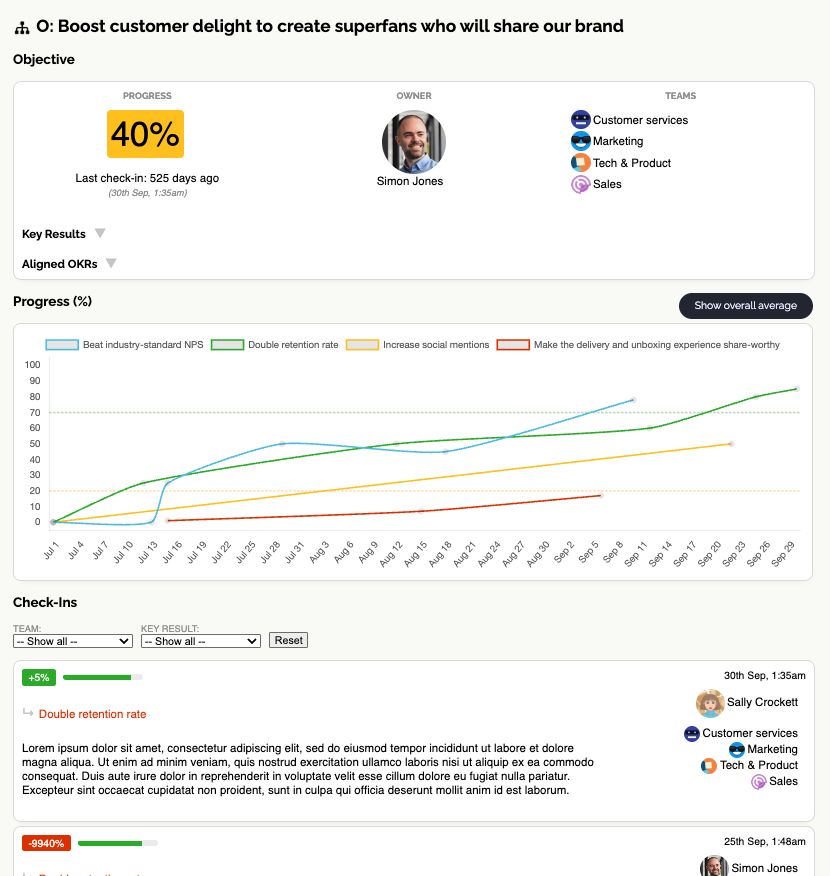
Instead of waiting for monthly rollups or leadership summaries, anyone in the company can open the OKR and immediately see:
- Where things are trending
- What changed recently
- What activity is happening around the goal
This is a big step toward one of the core ideas behind OKR Dash: OKRs should be visible, active, and shaping everyday work, not buried in planning documents or status slides.
We’re proud of this release, and it’s already making it much easier to understand how work across teams connects back to shared objectives.
Your OKRs now have a proper home. Want to create quality OKRs to fill it? Learn how to use AI prompts.