How To Drive Action from your OKRs
OKRs are meant to create focus and momentum. But in a lot of teams they become a document that gets updated once, then quietly ignored.
This article is a practical guide to making OKRs drive real work. True execution comes not from obsessing over OKR scores, but from maintaining focus on the work itself—as explained in why OKR scoring is a vanity metric.
The core building blocks are simple:
- Clear ownership
- Accountability culture
- Regular check-ins
- A habit that sticks
We'll explain the concepts, then show how to do it in our OKR software tool.
The Real Problems People Face With OKRs
Most OKR problems are not about setting goals. They are about getting anything done after the goals are set.
Here are the common failure modes:
-
OKRs drift - The quarter moves on, priorities change, and the OKRs do not keep up because they're never discussed.
-
No work gets done - Everyone agrees the OKRs are important, but nobody turns them into weekly actions.
-
No visibility of progress - Progress is vague, delayed, or missing. People are guessing, not managing.
-
Nobody to chase - When a Key Result is behind or blocked, it is unclear who is responsible for fixing it.
-
Accountability becomes awkward - Because ownership is unclear, follow-ups feel political or personal.
-
Check-ins become painful - Updates are scattered across spreadsheets, chats, slides and meetings. Nobody trusts the data.
-
OKRs turn into theatre - Progress is reported, but decisions do not change. The system exists, but it does not steer action.
The theme behind all of these is simple: if ownership and visibility are weak, action is weak.
Why a Single Owner Fixes Half the System
A Key Result without an owner is a shared task, and shared tasks usually slip.
When you assign a single owner:
- Someone is clearly responsible for moving the KR forward
- Blockers are more likely to be raised early
- Progress becomes more honest, because it belongs to a person
- Follow-ups become normal, because the role is clear
Ownership is not about blame. It is about clarity. A strong owner creates momentum, and makes it safe to talk about reality.
The owner is accountable, but may not be responsible. We all work together to support that person and contribute our different skills to get the job done. And we employ the obligation to dissent in a positive way. But they lead.
The extra piece: a hierarchy of accountability
Real teams are messy. People go on leave, priorities shift, and responsibilities blur. You still want a system where there is always a clear “next best” accountable person.
That is what a hierarchy of accountability is for.
In OKR Dash, accountability works like this:
- KR Owner
- Objective Owner
- Team members assigned to the OKR
- Anyone in the company
This gives flexibility, while still ensuring there is always a real person who can act. Ideally you'd never get to #4!
It also builds a healthy kind of shared accountability:
- The Key Result owner is on the hook first, overseen by the Objective owner
- The Team supports and helps unblock when needed
- The wider company can still see what matters and what needs attention, and step in when there's a gap
Everyone's always looking to see how to move things forward.
How to Set Owners in OKR Dash
You can assign owners at both levels:
- The Objective (O)
- The Key Result (KR)
In general:
- Set an Objective owner when someone is accountable for the overall outcome
- Set a KR owner when someone is accountable for a specific measurable result
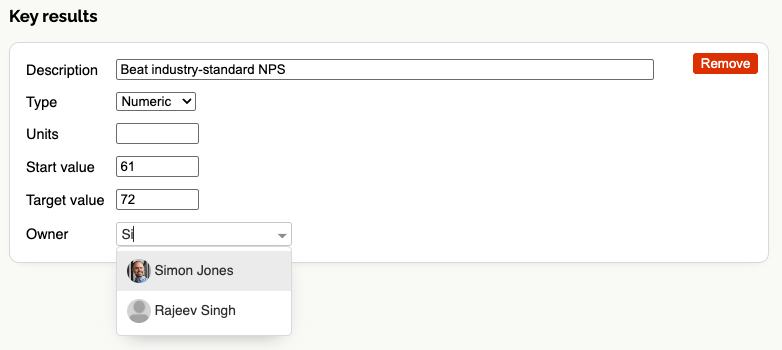
Step-by-step: set an Objective or Key Result Owner
- Click Edit on the Objective from the List view (or create a new one)
- Find the Owner field for either the Objective or the Key Result
- Enter the name to search, or just scroll through all users
- Select the owner and save
Where ownership shows up in the product
Once set, ownership appears across OKR Dash so it stays visible:
- On Objective and Key Result detail pages
- On dashboards and rollups
- In notifications and reminders when check-ins are overdue
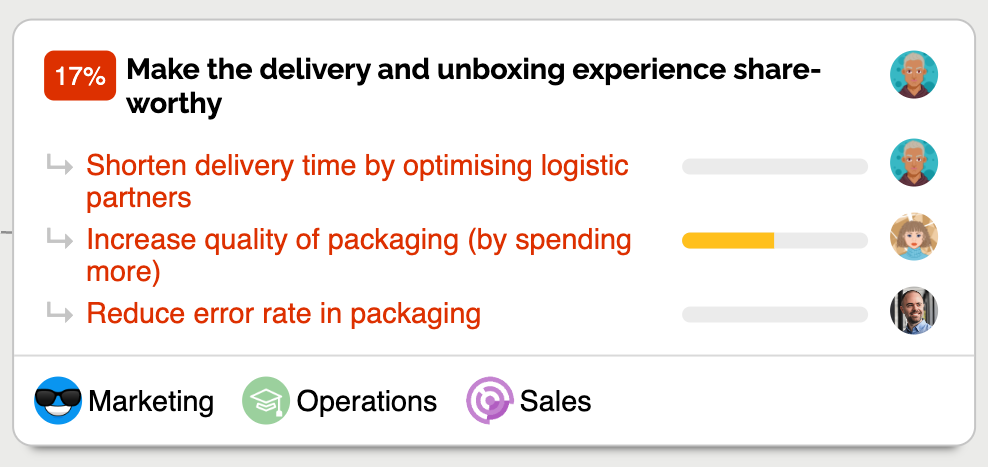
This matters because action happens when the right person is obvious at the right moment.
Regular Check-Ins Are the Backbone of OKRs
Ownership gives you accountability. Check-ins give you momentum.
A check-in is not a status report. It is a decision-making input. It answers key questions:
- What moved since last time?
- What is blocked?
- Are we on track?
- Do we need to change the plan?
Without check-ins, OKRs are a static plan. A best guess at what might happen during the quarter. With check-ins, OKRs become a living system that help you to steer the ship.
A simple check-in framework that works
You do not need anything complex. Most teams do well with a weekly rhythm:
-
Everyone updates their Key Results
- Usually on a Friday
- Record the current value of the KR
- Short comment on progress, deliverables, experiments, learnings etc
- Any blockers or risks
- Done by the Owner
-
Core team reviews together (sync)
- Usually on a Monday
- 15 to 30 minutes
- Focus on what is off track and what needs action
- Share any decisions more widely
- Led by the Owner
-
Wider stakeholders review (async)
- Share the dashboard or summary
- People can follow up with the Owner if they have questions
The important part is not the format. The important part is that updates are visible, reviewed, and used to make decisions.
How to Create Check-Ins in OKR Dash
Check-ins in OKR Dash are designed to be quick, consistent, and easy to find later.
Step-by-step: leave a check-in from a Key Result
- Click on any Key Result to open the KR Detail page
- Click Create check-in
- Enter the new current value
- Add a short comment (what changed, what is next, what is blocked)
- Save
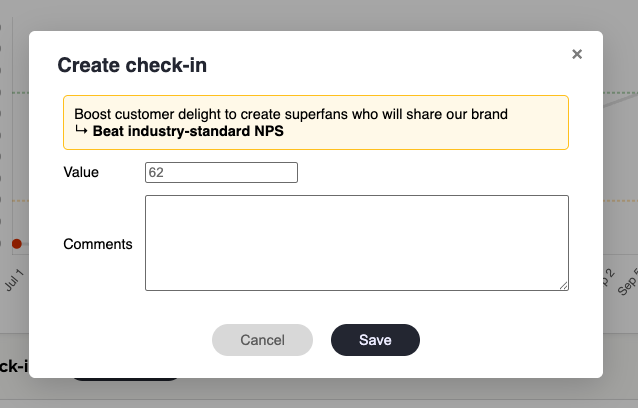
Once saved, the check-in becomes part of the KR history and is visible in the KR Detail page. This keeps updates in one place, instead of scattered across chat threads or meeting notes. For guidance on writing effective updates, read how to write OKR updates people actually read.
Make It a Habit (Because Habits Beat Motivation)
The best OKR systems are boring in a good way. They run on habits.
When check-ins become a habit:
- Progress becomes more consistent
- Problems show up earlier
- Leaders spend less time chasing updates
- Teams spend more time solving the right problems
- OKRs stop feeling like extra work
The Activity Feed reinforces this habit by making every update visible and interactive across the whole team.
The trick is how you build the habit.
And here's the thing: while this might sound like effort, you're already putting in loads of effort trying to manage a fragmented system of spreadsheets, docs, slides, emails etc; and creating different updates for different audiences. Streamline and simplify, and this will all be much easier.
The goal for reminders: trigger action, not avoidance
Reminders can easily become spam. If you send too many, people tune them out. If you send none, you get no action. And we're trying to create behaviour change, so they must be consistent.
Good reminders are:
- Timely
- Relevant
- Focused on action
- Light on noise
They should support a positive culture: "Here is what needs attention", not "You forgot again".
How Reminders Work in OKR Dash
OKR Dash supports reminders in two places: in-app notifications and weekly email summaries.
This combination works well because:
- In-app notifications help you act while you are already in the tool
- Weekly emails create a routine and nudge people back into the habit
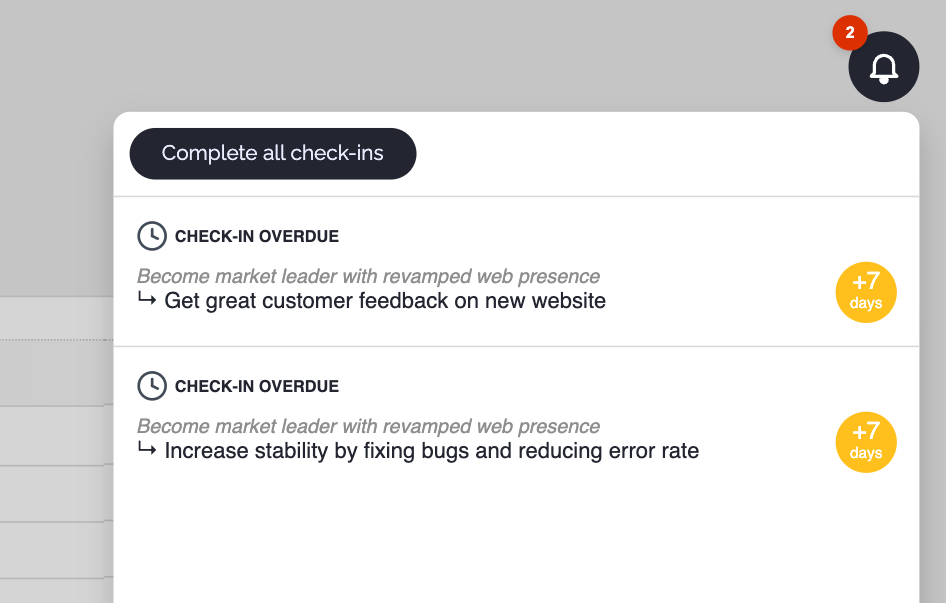
In-app reminders for overdue check-ins
If a check-in becomes overdue (Admin configurable), OKR Dash shows an in-app notification to the most accountable person, in order of the hierarchy.
Notifications refresh twice per day so any changes to ownership, teams, and assignments are reflected quickly.
Weekly email summary
Once per week, on a day configured by an Admin, users receive a summary email listing their outstanding check-ins.
This supports a weekly routine:
- A predictable time to review and update
- A simple checklist to clear
- A gentle nudge that does not interrupt the workday
A reminder only works if the action is easy. That is why OKR Dash also supports a multiple Check-In workflow which steps through all the outstanding Key Results owned by that user.
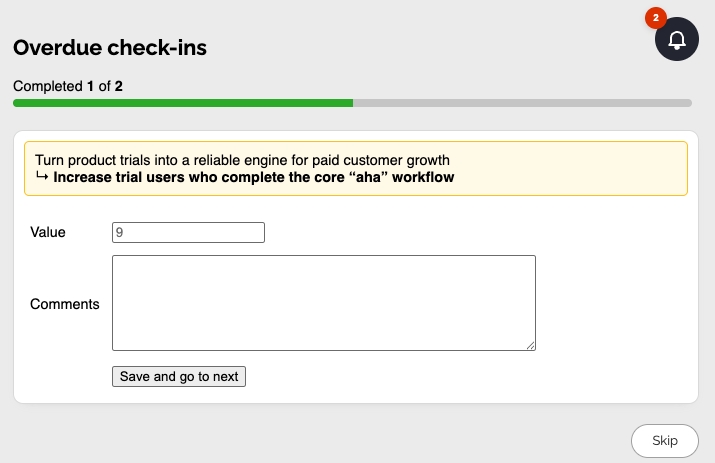
This is accessible from the Notification Centre, or the weekly summary email. When it's easy to create Check-Ins, they're more likely to get done.
Why a Dedicated OKR Tool Beats Spreadsheets and Docs
Spreadsheets and docs are fine for writing OKRs down. They are not great for running OKRs as an operating system.
For the specific goal of driving action, dedicated software wins because it provides:
- Clear ownership shown everywhere, not hidden in a cell
- A consistent check-in workflow, not ad hoc updates
- Overdue tracking and accountability, without manual chasing
- Reminders that support habits, not inbox clutter
- A single source of truth for progress, history, and context
If you care about ownership and check-ins, you want a system that makes them unavoidable in the best way.
In Summary...
If your OKRs are not driving action, it is rarely a strategy problem. It is usually a system problem.
To fix it, focus on:
- Assigning a single owner for every Objective and Key Result
- Using a hierarchy of accountability so responsibility never disappears
- Running regular check-ins that create visibility and decisions
- Building a weekly habit with gentle reminders and low-friction updates
OKRs work when they are alive week to week.
Try It Now: Make Your OKRs Actually Move
If you want OKRs that stay visible, stay owned, and stay on track, try OKR Dash.
👉 Register now and set up your first cycle in minutes. It's free!
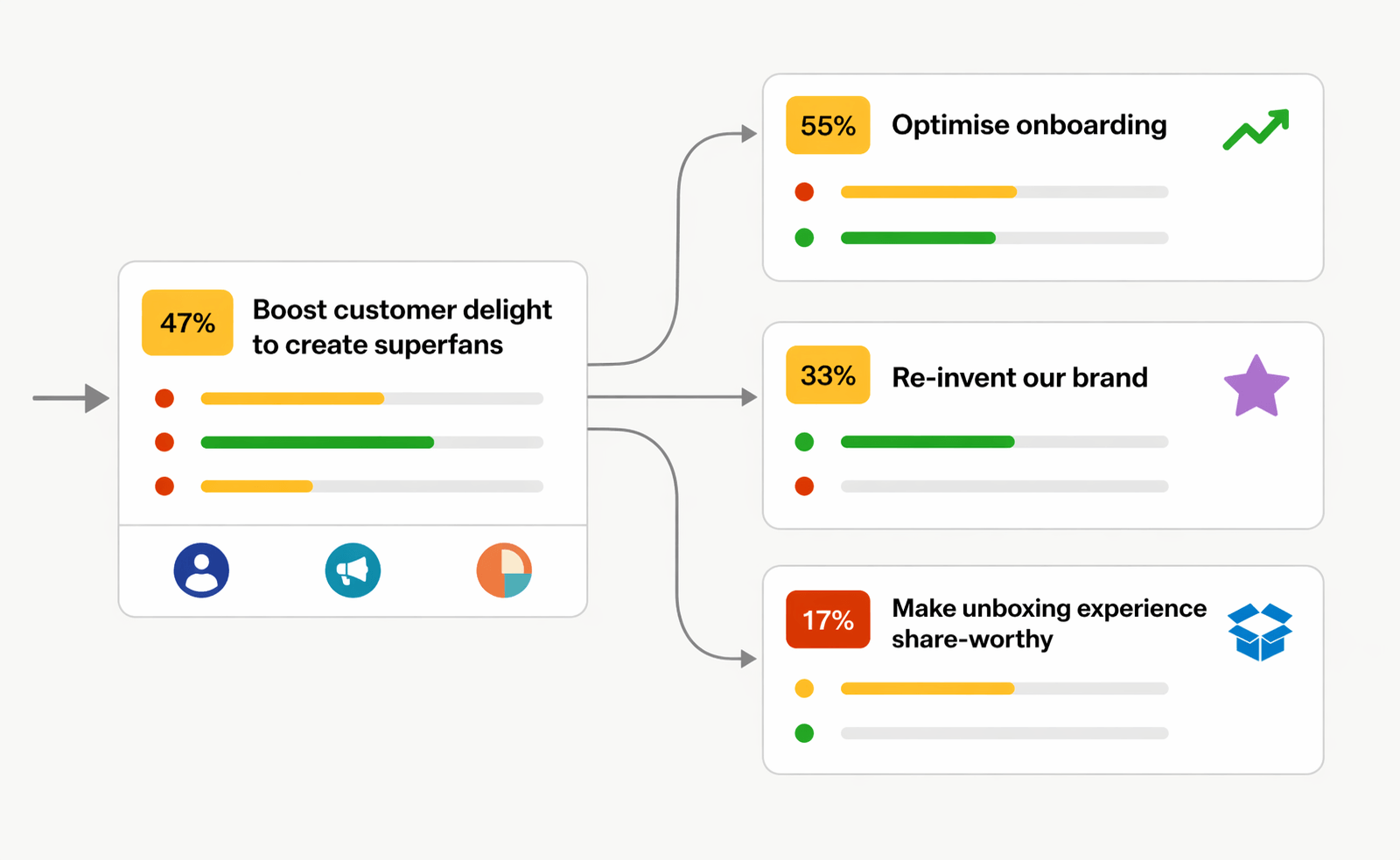
OKRs done right.
OKR Dash is a powerful tool for managing your OKRs.
No more siloed spreadsheets or manual tracking. One place to align teams and drive outcomes.